Showing posts with label apps. Show all posts

Monday, August 18, 2014

Getting out of the teaching rut!


With any job it’s easy to eventually find oneself in a rut, doing things the same way over and over. I know back when I was teaching, sometimes the pressures of grading, paperwork, and the real world meant that I didn’t try to teach a lesson differently or try something new with my students. Maybe I blamed it on the fact that I had four class preps, but no matter what the reason, it was always very rewarding to take time to try a new innovative lesson and see it work very well in the classroom.
 
As we start a new school year, there is no better time for teachers to investigate something new. And whether it is something truly transformative to teaching, or maybe just a tool to make teaching a little more efficient, any improvement is a step in the right direction.
 
Maybe a simple tool to motivate good student behavior is what is needed; then try ClassDojo. Or maybe increasing communication with students and parents is a pressing need. Tools like Remind or Class Messenger will help improve communication.
 
Want students to be more involved in class? Then give Socrative or ExitTicket a try. Is it time to find a new way to curate and synthesize web content for students or for students to do so as they learn? Then head on over and try super simple Blendspace or LessonPaths.
 
Sometimes it’s much easier to take baby steps to get out of the rut, rather than trying to climb the ladder and change everything at once. So make a new school year resolution for you or your staff to take a baby step or two on your path of improvement. For more info on these tools, view my blog entry and presentation about them.

                This blog entry is cross posted with the great folks at SchoolCIO

Monday, May 5, 2014

The mobile app imperative

It's not news that mobile device adoption continues to surge.  Smart phones and tablets are everywhere and the price barriers to adoption have collapsed. Many schools have embraced mobile devices and have adopted tablets or allowed BYOD, or both.  

One area schools are lagging behind in is putting their web content in a format that consumers prefer on those devices.  A visit to most school web sites still shows that the sites themselves are not mobile friendly.

But before jumping off the deep end and telling everyone to make a mobile friendly web site, a close look at some recent statistics is in order.  Techcrunch had 2014 as the year total desktop web users were first outnumbered by mobile web users.  And in K-12 we are already seeing more families where their only Internet access is via a mobile device. But before making your site mobile, consider this key metric from Flurry Analytics.   Their recent data shows that in just once year, mobile device users spend 86 percent of their time in mobile apps daily, versus just 14% on the mobile web. Mobile web use fell 6% in just one year.  

So while appeasing the voracious mobile beast, K-12 districts need to look at their strategy closely. Is a mobile web site good enough? The data says otherwise.  Districts are going to need to seriously look at creating a mobile app, paying a company to do it, or subscribing to one of the increasing number of K-12 mobile app providers.

This blog entry is cross posted with the great folks at SchoolCIO

Thursday, March 27, 2014

The Texas Calculator Debate

Over Spring Break in Texas, the Austin American Statesman published an article about Texas school districts being upset that they were going to have to spend $100 a calculator for eighth grade students taking the state math assessment, as required by the Texas Education Agency (TEA). The gist of several districts' concerns is that they would rather spend the $100 on a more versatile device for students' learning than a calculator that will one be used only for math. And many districts already have tablet 1:1 initiatives where both Apples' App store and Google's Play store have many free or low-cost graphing calculator apps. Why should these districts have to spend $100 more per device, especially given that the state issued the calculator mandate without any funding to support it? Fast forward to March 20 and the TEA's Commissioner of Education, Michael Williams, issued a press release allowing districts to pilot students using graphing calculator apps on tablets on a pilot basis. This was a welcome move for districts not wanting to spend money on calculators when they already have multifunction tablets that already can host a calculator app. Notably missing from the announcement was allowing other devices to be used for testing, such as laptops or Chromebooks, which also have graphing calculator apps. Nonetheless, it is refreshing to see a state agency trying to help districts use their funds for tools that best match students' needs. 

Thursday, March 6, 2014

How districts are feeding the mobile app beast?

I forgot to post this article on the Judson ISD Connect! mobile app that was done by Edtech magazine in October 2013.

Check out the article at: http://www.edtechmagazine.com/k12/article/2013/10/how-districts-are-feeding-mobile-app-beast


Sunday, February 16, 2014

Where is the app integration and innovation in K-12?

I came back from TCEA, underwhelmed, not by the myriad of great presenters, but by vendor product offerings.  Where were the companies transforming education and interconnecting systems so that educators can leverage multiple platforms as needed to help provide a better more integrated learning experience?  Most of what I saw was just incremental improvements of existing products.  While there were some standouts, I was not wowed.  

I came home to beautiful warm weather over the weekend and decided to
Endomondo
work off too many conference calories by exercising.  I thought about how technology has transformed fitness for me in the past couple of years and it struck me that other industries are embracing interconnected app and data ecosystems much faster than K-12 Education.  I use an app called MyFitnessPal to track weight, calories, exercise and more.  I chose this app mainly because of its very robust third party integration.  It integrates with Endomondo, which I use to track running, walking, and cycling. So I donned my bluetooth headset, which allowed me to play cloud streamed Spotify music, while I biked many miles be tracked by GPS on Endomondo. At the end of the ride my ride data was automagically synced from Endomondo to MyFitnessPal, allowing me a seamless experience that made working out a less taxing more enjoyable experience.  That is what is needed in education. We need products that integrate easily together and provide students and staff enjoyable and powerful educational experiences.  


We are seeing more companies do this. Products such as Google Apps for Education, Schoology, and Edmodo, just to name a few are working on app ecosystems so staff and students can easily integrate apps and data for a seamless and more productive learning experience.  We need a lot less siloed products that are hard to manage and do not share data and functions with other apps or systems.  Am I wishing for too much, or do our students deserve this?

This blog entry is cross posted with the great folks at SchoolCIO

Sunday, December 8, 2013

Do you have a new year's resolution to stay organized? Try my favorite productivity tool, Evernote

Sometimes, I feel like am very organized, then other days I feel as if I am anything but organized.  But generally I feel I do a good job utilizing task lists, to do lists, documenting ideas, mileage, meeting notes, instructions, web pages, tips, etc.  Over the years I have used many techniques to record this info, from paper, 3M sticky notes, to notes in Outlook.  But hands down, the best tool I have ever used for this is Evernote -  http://evernote.com/evernote/ .  As busy leaders, a tool like Evernote can prove indispensable to maintaining organized information in a hectic work world of information overload.

Evernote is a free productivity tool that I feel basically acts as my second brain many days, allowing me to easily find chunks of information that I probably would have otherwise forgotten or lost.  Evernote is available on the following platforms: 
And even without a software or app install, Evernote is always available just through a web browser.  So as long as you carry a smart device, you will have Evernote at your side, ready to record info you do not want to forget.  

There are a million ways to user Evernote, or maybe more, judging from all the blogs post and list of uses you will find from a quick perusal of Google search results, from a query such as this: https://www.google.com/search?q=way+to+use+evernote .

I keep all sorts of information in Evernote, which allows you to store related information in notebooks, which are pretty much what they sound like.  You could have one giant notebook, or organize notes into a notebook for every subject.  I am not a big filer – I use about five main notebooks for a majority of what I file.  Much like my email filing technique, where I stopped being an email filer several years back and now I rely on search queries to find information, saving me the countless hours of filing emails, or in this case notes.  I keep the following notebooks in Evernote: Systems, Work, Personal, Recipes to Try, and Best Recipes.  A way I find useful that allows you to further make notes searchable, and findable, is by adding tags to notes in Evernote. As many tags can be added to a note as you want, allowing you to quickly find the note at a later time, but if you don’t tag notes, Evernote still has a robust search system built in to help you find your notes.

And this is where Evernote really shines and ends up being what I call my second brain.  I have Evernote on at least three computers, three tablets, and my phone.  What is great is that all of these devices keep their notes in sync, such that I can save a note on my phone during the busy work day, then fire up my tablet in the evening, to find the note waiting for me.  So I may clip a web page in my web browser, using the Evernote Web Clipper Extension - http://evernote.com/webclipper/ , which I can then later access on any of my devices when I need it. The web page is fully indexed, so I can search for a word or subject that was on the page, without having to remember what web site I had found the info on.

I also file lots of emails into Evernote.  If I receive an email that has information I need to keep, then I forward it to an email address that Evernote has attached to my account.  I think this is one of Evernote’s most powerful and often overlooked features.  To find out the email address to send notes to for your account, in the software, go to the Tools menu and choose Account Info.  On a mobile device or tablet, click on your name to see Account Info.  You will see an address to email notes to, which will then be automatically placed into your notebook.  This is fabulous and makes retaining a few really important emails all the easier.  I often send receipts, software licenses, and other things I need to keep to my Evernote email address so I can find them easily later.

If you have not joined the Evernote revolution, and you are looking to start the New Year out better organized, then I highly recommend you try out Evernote and see how it works for you.  Do you have an Evernote super tip?  Then feel free to leave a comment and share it with the world at http://ctotechnotes.blogspot.com/

This blog entry is cross posted with the great folks at SchoolCIO

Sunday, September 15, 2013

Web innovation in government and education?

On Friday I had the pleasure of spending time with a very interesting and exciting group of web innovators.  No I did not spend a day the Googleplex or at Twitter.  I got to spend time with the winner of the DigitalEducation Achievement Awards and the Digital Government Achievement Awards.  People might think that government and education are the backwaters of innovative web services; they would be wrong.  There is a lot of talent and innovative use of web services at all levels of government and education.


The overarching message I took away from talking with fellow award winners was that all of us should be looking at providing data for our customers in formats friendly to their consumption devices.  The talk was all about responsive web design, allowing web content to work regardless of device of the end user.  The other take away was that our customers, who in our case are students and parents, want data immediately.  Long gone should be the days when a parent finds out that their student is doing poorly in a class, at which time it is way too late to work on helping them increase the grade.


I urge you to take some time (or have your school or district web gurus do so) to look at the award winners linked above. They have some truly innovative apps and web sites, which we can all use as ideas to help us improve what our parents and students are demanding.

Wednesday, June 13, 2012

Mashable - Apps Used To Take Stand Against Bullies

Mashable published a nice story on schools and students using apps to report bullies.  The article featured a great app by Tim Porter, Stop Bullies, and mentions our team's fantastic Judson ISD Connect! app.  It also features a great classroom project where students created their own anti-bullying app.


The story is available on Mashable at http://mashable.com/2012/06/11/bullying-apps/


Wednesday, May 2, 2012

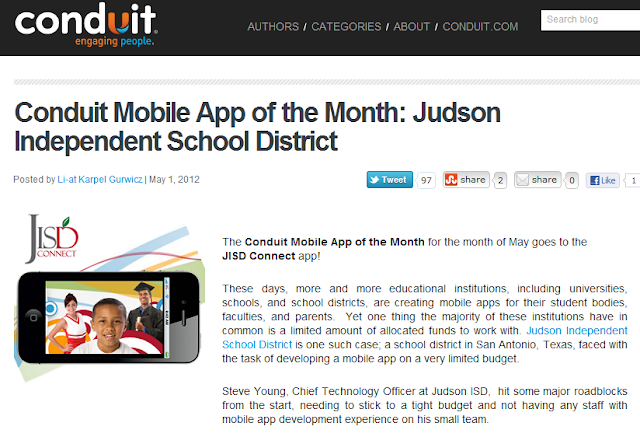
Judson ISD Connect! App named App of the Month by Conduit Mobile

Our Judson ISD Connect! app today was named the May 2012 app of the month by Conduit Mobile.  At the same time we are proud to announce a major upgrade of the app with addition of Parent Center mobile, which adds grades, attendance, and more for both student and parent viewing.


The full blog post on the app of the month is available here on the Conduit Blog.


Blog on Conduit Mobile awarding Judson ISD Connect! as May 2012 app of the month

Monday, March 26, 2012

iPad Productivity Apps (for Principals & Administrators)

I am going to be training our principals (and other administrators) on productivity apps for better utilizing their iPads.  I have talked with several people, who have given some great ideas and many people across the state have contributed ideas through the TECSIG email list.   So far, here is the list of iPad apps for productivity (this list would probably work for more than just educators):


iPad Apps for (Principal and Administrator) Productivity
Stock iPad Apps
Safari
Web Browser
Included with iPad
Contacts
Syncs with Exchange (Outlook)
Included with iPad
Email
Syncs with Exchange (Outlook)
Included with iPad
Calendar
Syncs with Exchange (Outlook)
Included with iPad
Camera
Takes pictures
Included with iPad
Photos
Email, tweet, your photos..
Included with iPad
FaceTime
Real time video conference with other iOS users
Included with iPad

Notetaking Apps
Evernote
The e-filing cabinet of choice – use as your memory.  Stores emails, text notes & audio.  Syncs across many devices and web.  Great search!
Free
Notability
Any easy to use simple text, written, audio and photo note app – email or PDF notes
$9.99
GoodReader
Great PDF annotation and reader software
$4.99
PDF Expert
Simple PDF annotation with WiFi transfer and Box support
$9.99
Audio Memos Free
Voice recorder, email up to 3mb files, WiFi download
Free
Dragon Dictation
Voice to text transcriptions
Free

Office Apps
Pages, Numbers, and Keynote
Apple’s GREAT office apps for Word Processing, spreadsheet, and presentations.  These are the apps to use if using iPad for content creation.
$9.99 each 
QuickOffice Pro
All in one office suite – edits Microsoft Office docs and syncs with Box.net and WiFi file transfer.  This more affordable suite is geared towards just editing.
$14.99
CloudOn
Cloud-Based MS Office with Box synchronization
Free
Digits Calculator
Great desktop calc with editable, comment-able eTape that can be emailed
$1.99
Dictionary.com
Great dictionary and thesaurus
Free

Book  Apps
iBooks, Nook & Kindle
eBooks from the big three.
Free

News Apps
Pulse
Incredible customizable news aggregator
Free
FlipBoard
Another great customizable new aggregator
Free
Texas Tribune
Stay on top of Texas news and the legislature
Free

Other Useful Apps
Box
App to synchronize files to the cloud and web browser..use to move files between PC and iPad
Free
Citrix
Get a JISD Windows desktop and use MS Office,  access your H and T drives, etc
Free
Twitter
Great social networking tool to expand your PLN
Free
iThoughtsHD
Easy mind mapping with Image & PDF export and Box synchronization
$9.99
Skitch
Simple annotation app – take a photo and mark up ideas and notes (syncs to Evernote)
Free
Explain Everything
Annotate and narrate on screen then export video – great way to narrate presentations then share
$2.99

Friday, March 23, 2012

Tech & Learning Magazine - How We Developed A Mobile App for Our School District – You Can Do It Too

Tech & Learning magazine published my article on how we developed our Judson ISD Connect! mobile app for iOS and Android.


The article cover how we used Conduit Mobile to easily create a published app for our community.  The article is more in depth than the prior CTO Technotes blog entry.


The T&L article is available on their site at: http://www.techlearning.com/Default.aspx?tabid=67&EntryId=4041