Showing posts with label mobile app. Show all posts

Thursday, May 15, 2014

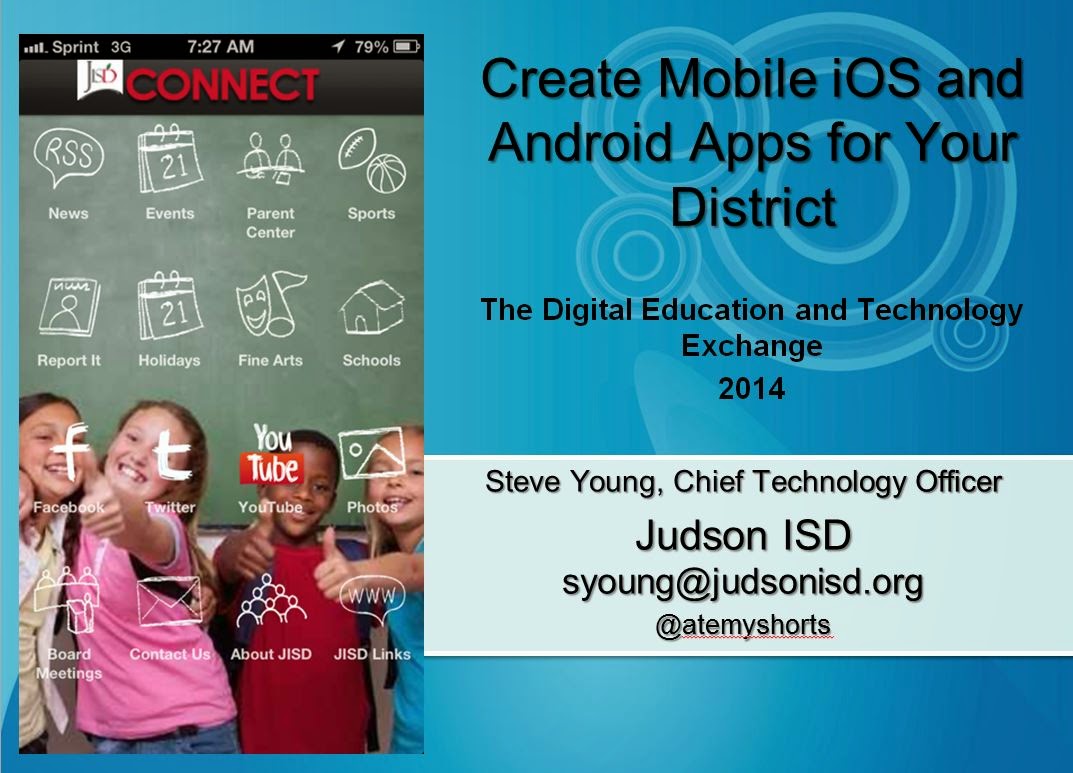
Create Mobile iOS and Android Apps for Your District

Here is an update to my mobile app creation presentation for the The Digital Education andTechnology Exchange

Create Mobile iOS and Android Apps for Your District

Creating Mobile Apps


Thursday, March 6, 2014

How districts are feeding the mobile app beast?

I forgot to post this article on the Judson ISD Connect! mobile app that was done by Edtech magazine in October 2013.

Check out the article at: http://www.edtechmagazine.com/k12/article/2013/10/how-districts-are-feeding-mobile-app-beast


Sunday, December 8, 2013

Do you have a new year's resolution to stay organized? Try my favorite productivity tool, Evernote

Sometimes, I feel like am very organized, then other days I feel as if I am anything but organized.  But generally I feel I do a good job utilizing task lists, to do lists, documenting ideas, mileage, meeting notes, instructions, web pages, tips, etc.  Over the years I have used many techniques to record this info, from paper, 3M sticky notes, to notes in Outlook.  But hands down, the best tool I have ever used for this is Evernote -  http://evernote.com/evernote/ .  As busy leaders, a tool like Evernote can prove indispensable to maintaining organized information in a hectic work world of information overload.

Evernote is a free productivity tool that I feel basically acts as my second brain many days, allowing me to easily find chunks of information that I probably would have otherwise forgotten or lost.  Evernote is available on the following platforms: 
And even without a software or app install, Evernote is always available just through a web browser.  So as long as you carry a smart device, you will have Evernote at your side, ready to record info you do not want to forget.  

There are a million ways to user Evernote, or maybe more, judging from all the blogs post and list of uses you will find from a quick perusal of Google search results, from a query such as this: https://www.google.com/search?q=way+to+use+evernote .

I keep all sorts of information in Evernote, which allows you to store related information in notebooks, which are pretty much what they sound like.  You could have one giant notebook, or organize notes into a notebook for every subject.  I am not a big filer – I use about five main notebooks for a majority of what I file.  Much like my email filing technique, where I stopped being an email filer several years back and now I rely on search queries to find information, saving me the countless hours of filing emails, or in this case notes.  I keep the following notebooks in Evernote: Systems, Work, Personal, Recipes to Try, and Best Recipes.  A way I find useful that allows you to further make notes searchable, and findable, is by adding tags to notes in Evernote. As many tags can be added to a note as you want, allowing you to quickly find the note at a later time, but if you don’t tag notes, Evernote still has a robust search system built in to help you find your notes.

And this is where Evernote really shines and ends up being what I call my second brain.  I have Evernote on at least three computers, three tablets, and my phone.  What is great is that all of these devices keep their notes in sync, such that I can save a note on my phone during the busy work day, then fire up my tablet in the evening, to find the note waiting for me.  So I may clip a web page in my web browser, using the Evernote Web Clipper Extension - http://evernote.com/webclipper/ , which I can then later access on any of my devices when I need it. The web page is fully indexed, so I can search for a word or subject that was on the page, without having to remember what web site I had found the info on.

I also file lots of emails into Evernote.  If I receive an email that has information I need to keep, then I forward it to an email address that Evernote has attached to my account.  I think this is one of Evernote’s most powerful and often overlooked features.  To find out the email address to send notes to for your account, in the software, go to the Tools menu and choose Account Info.  On a mobile device or tablet, click on your name to see Account Info.  You will see an address to email notes to, which will then be automatically placed into your notebook.  This is fabulous and makes retaining a few really important emails all the easier.  I often send receipts, software licenses, and other things I need to keep to my Evernote email address so I can find them easily later.

If you have not joined the Evernote revolution, and you are looking to start the New Year out better organized, then I highly recommend you try out Evernote and see how it works for you.  Do you have an Evernote super tip?  Then feel free to leave a comment and share it with the world at http://ctotechnotes.blogspot.com/

This blog entry is cross posted with the great folks at SchoolCIO
Sunday, April 14, 2013

Schools and districts should not ignore the mobile app tidal wave


How many smart phone users consume their favorite social media sites like Facebook, Linked In, or Twitter via a mobile web browser?   The answer is very few and usually they only do so if forced to use the browser by clicking a link that opens it.  Why is this?  Why do consumers want to avoid surfing web sites on their mobile devices’ browsers?  The answer is that most standard web sites, when looked via mobile phone’s browser, are hard to see, hard to navigate, and often don’t support mobile browsers well.  The end user experience in these browsers is about as pleasant as a trip to your local Department of Motor Vehicles to renew your license.
mobile apps on an iPhone
Social media providers have long figured this out and built apps for major phone and tablet platforms.  Stores are increasingly figuring this out and following the likes of Amazon with building mobile shopping apps. Banks are all over this bandwagon.  But schools and districts have not figured this out.
Schools typically still only provide a normal web site to mobile devices.  Sure, some provide a parsed down mobile version, but even these are somewhat hard to find.  Are schools’ customers different than retail or social media customers?  Heck no – they are the same people with the same preference for consuming web through mobile apps.  Most school customers are still getting Y2K versions of web sites built for Netscape Navigator delivered to their smart phones.

School CIOs need to address this shortcoming and get mobile apps built with easy to navigate user interfaces.  And to have a successful app, it will need to be for both Android and iOS.  Additionally, it must have data that is personally important to parents and students.  That means grade and attendance data is a critically important inclusion.  Other high value content such as menus, athletic schedules, athletic scores, and assorted news are welcome additions. 

Judson ISD Connect! mobile app
There are many roads to getting this done. Some are expensive, such as hiring a third party to build custom apps or hiring personnel with app development skill, but this may be a fine fit for a large district.  Sometimes more limited apps are included with a student information system (SIS) and are probably the best fit for small districts and schools.  Consider including this as a requirement when adopting a new SIS.  There are also low cost or free ways to get an app.  At Judson ISD we built an award winning app for a low cost without personnel dedicated to app programming, using the low cost web-based Conduit mobile platform.  A full presentation of our app and experience is available on Slideshare.

Or you may use a simple free service such as iSchoolBox, which may be a great way to test the waters and get your school into a mobile app (one app the hosts many schools’ mobile sites).  At the end of the day, the consumer demand is there and as CIOs and technology leaders, we need to stop delivering craptastic web sites to phones and tablets when our customers’ preferences have evolved well beyond this.

Thursday, October 18, 2012

Judson ISD Connect Mobile App Takes the Bronze Lovie Award


Yesterday we received notification that the Judson ISD Connect! mobile school app for Android and iOS received a Bronze award in the European Lovie Awards.  I am so very proud of my co-workers who worked very hard to make this app what it is.  I am also most appreciative of Conduit Mobile and their fantastic team who worked with us to make the app better and resolve issues to make the app what it is today. More info on the app is available at the app page at http://www.judsonisd.org/district/technology/jisd_mobile.cfm or read about our development experience here in the CTO Technotes blog via Tech & Learning Magazine.


Friday, May 4, 2012

Judson ISD Technology Services May 2012 Uplink Newsletter Published

Judson ISD's May 2012 Technology Services' Uplink newsletter has been published at http://www.judsonisd.org/district/technology/newsletters/JudsonISDTechnologyServicesUPLINKNewsletterMay2012.cfm

UPLINK :: Technology Services Newsletter

There are many informative articles, including: Windows 7 upgrades, Improving Email Services, iPad Apps for Productivity Enhancement, Using Twitter to Create a Personal Learning Network, and more!.  So please take a few minutes and get updated on technology at Judson ISD by reading our May 2012 newsletter.

Wednesday, May 2, 2012

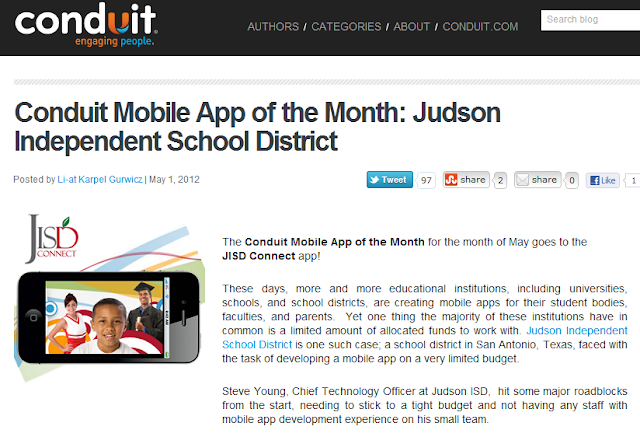
Judson ISD Connect! App named App of the Month by Conduit Mobile

Our Judson ISD Connect! app today was named the May 2012 app of the month by Conduit Mobile.  At the same time we are proud to announce a major upgrade of the app with addition of Parent Center mobile, which adds grades, attendance, and more for both student and parent viewing.


The full blog post on the app of the month is available here on the Conduit Blog.


Blog on Conduit Mobile awarding Judson ISD Connect! as May 2012 app of the month

Friday, March 23, 2012

Tech & Learning Magazine - How We Developed A Mobile App for Our School District – You Can Do It Too

Tech & Learning magazine published my article on how we developed our Judson ISD Connect! mobile app for iOS and Android.


The article cover how we used Conduit Mobile to easily create a published app for our community.  The article is more in depth than the prior CTO Technotes blog entry.


The T&L article is available on their site at: http://www.techlearning.com/Default.aspx?tabid=67&EntryId=4041


Wednesday, February 1, 2012

Judson ISD Connect Mobile Application for iPhone, iPad and Android

After talking with a fellow technology leader about a rapid development tool for easily creating iOS (iPhone and iPad) and Android applications, I decided that I would investigate just how easy, or how difficult, the actual development of an Apple iOS and a Google Android application might be.  I was not sure of what kind of challenge this might be, given that I have only developed web pages and ColdFusion applications in the past.

I created an account at Conduit Mobile to investigate the process and after trying ideas out for about an hour, I knew that given the high number of great news, photo, video and other social media feeds that Judson ISD has, I could easily develop a great mobile application for our community. 

So I set aside a half day with my fantastic web team ( and one giant pizza to feed great minds ) consisting of a webmaster and web application developer and we mapped out a plan for the few hours we had put aside to work on our mobile app.  I focused on configuring the app, while the webmaster created couple of custom RSS feeds and the web app developer worked on some graphics.  We had most of the app ready within that afternoon, with everyone spending a couple more hours on their part in the next day or so.

Here is where I spent a lot of time putting the app parts together in Conduit mobile:


The most difficult parts of this project was the registering for becoming and Apple and Android developer and the associated application submissions and approvals.  The time from account creation to our application being published took no more than three weeks time, but would have been quicker had I not encountered some application build errors with Conduit Mobile.

I am very excited we were able to create such a useful app with so little time and money.  I think the end product is professional and very usable for our staff, students, and community.   

Below is the info from our Judson ISD mobile application page:

Judson ISD Connect Mobile Application for iPhone, iPad and Android


Conduit Mobile graphic
Using the freely available Conduit Mobile application platform, Judson ISD has leveraged its existing news, social media activity, photos, sports schedules, sports scores, video and bully reporting to offer our community a convenient iPhone, iPad, and Android application where they can conveniently browse our web content. We know today's mobile users like to consume web content via apps, rather than traditional web pages. The application is free of charge for anyone wanting to use from their existing smart phone or tablet.
This application was entirely built in house and the only cost besides some staff time, and the $499 Conduit Mobile premium lifetime subscription, was the $124 spent for Judson ISD to become approved developers for Apple and Android.
While there are no definitive plans for what might be added to this app in the future, we have many ideas about what we might add to this application in the future.
Please visit the links below to the Judson ISD Connect mobile application in the iTunes App Store and the Android Marketplace.
Here are some application screen shots - please download the latest version of the application to see the most current screens:
Judson ISD Connect! home screen
Judson ISD Connect mobile app photo gallery

Judson ISD Connect mobile app Twitter feedJudson ISD Connect mobile app news feed

For more information about our application and our development experience, please contact Steve Young, Chief Technology Officer for Judson ISD at (210) 945-5562 or by email at syoung@judsonisd.org