Showing posts with label schools. Show all posts

Wednesday, June 24, 2015

Can Schools Become Future Ready When Families Aren’t Connected?

One of the most vexing challenges for schools trying to convert to becoming Future Ready by transitioning to digital learning, is the persistently large number of students from families that do not have Internet access

Internet access alone will not bring about a change in learning, but it can support reshaping classrooms and schools that are embracing flipped classrooms, student-based discovery, and personalization of learning. For schools looking to put devices in the hands of students, the lack of Internet access in many homes is a major stumbling block. Schools and some Internet service providers have tried to address this access gap with varying degrees of success and creativity. Coachella Valley Unified School District parked Wi-Fi equipped buses in neighborhoods of greatest need, while Forsyth County Schools partnered with local business who would offer students free Wi-Fi and a safe place to work on homework. Comcast has offered a basic Internet plan to families in its markets for $9.95 a month. Pasadena ISD near Houston, Texas is going so far as to build their own LTE broadband network, but for most school this type of build out has far too many technical and financial hurdles.

 Will the Federal Communications Commission (FCC) come to the rescue? It very well might, as last week the FCC voted to change its Lifeline program, which subsidizes telephones for low income families. The change would subsidize just under $10 a month for broadband Internet for low income families. The FCC already transformed e-Rate this year. Will the Lifeline program change be another shift in policy that can really help schools bridge the access divide? This could be a huge opportunity for schools to encourage families to sign up for low- or no-cost Internet and have the same learning opportunities that other families with Internet access have.

Friday, May 22, 2015

Check out - The Right Connections - how to keep school communities informed

Judson ISD and it's fantastic home grown Parent Center app were featured in Technology & Learning's May 2015 cover story, Now Hear This: The Right Connections - how to keep school communities informed - from  

Friday, May 15, 2015

What keeps CTOs up at night?

Judson ISD along with two of my great counterparts at Tyler ISD and Calcasieu Parish Public Schools are featured in the eSchoolNews May 2015 cover story, “What keeps CTOs up at night?” which I have attached and can also be viewed online at http://www.eschoolnews.com/current-issue/ 

Tuesday, September 23, 2014

Buying buses without drivers - and computers without support

Our local group of K-12 technology leaders shared some interesting numbers this past week about how many devices each one of their technicians usually supports. The numbers were very telling, especially when looked at in the light of the increasing spend on educational technology, which topped out at over $13 billion this past year, up over 11% from the past year.  Several districts shared that their technicians were now supporting between 1,100 and 1,300 devices each.  By any measure, this is a daunting workload for one person. One district shared that its workload for each technician was more than 1,900 devices. This monumental workload is only being increased as schools increasingly turn to technology for almost all back office functions and instructional use. 
 
Can we really expect that teachers and students are getting the attention they need and work-order turnaround times they deserve, when they rely so heavily on technology? In what other industry should a professional have to wait a week to have his or her technology operational again? Yet in K-12 this happens all the time, as schools buy more software and hardware, yet fail to fund the personnel needed to ensure high availability and quick repair times. 
 
Many technology departments have even faced personnel cuts, as budgets have been tightened. Is this really setting K-12 up for success in implementing technology, or is this a recipe for disaster? What district would add 100 buses to its fleet without more mechanics and bus drivers? Of course this would not be done, as it is plainly ridiculous. Nonetheless, districts do this with technology every day, without assessing the real impact on teachers and students of having poorly supported technology.

                    This blog entry is cross posted with the great folks at SchoolCIO

Monday, May 5, 2014

The mobile app imperative

It's not news that mobile device adoption continues to surge.  Smart phones and tablets are everywhere and the price barriers to adoption have collapsed. Many schools have embraced mobile devices and have adopted tablets or allowed BYOD, or both.  

One area schools are lagging behind in is putting their web content in a format that consumers prefer on those devices.  A visit to most school web sites still shows that the sites themselves are not mobile friendly.

But before jumping off the deep end and telling everyone to make a mobile friendly web site, a close look at some recent statistics is in order.  Techcrunch had 2014 as the year total desktop web users were first outnumbered by mobile web users.  And in K-12 we are already seeing more families where their only Internet access is via a mobile device. But before making your site mobile, consider this key metric from Flurry Analytics.   Their recent data shows that in just once year, mobile device users spend 86 percent of their time in mobile apps daily, versus just 14% on the mobile web. Mobile web use fell 6% in just one year.  

So while appeasing the voracious mobile beast, K-12 districts need to look at their strategy closely. Is a mobile web site good enough? The data says otherwise.  Districts are going to need to seriously look at creating a mobile app, paying a company to do it, or subscribing to one of the increasing number of K-12 mobile app providers.

This blog entry is cross posted with the great folks at SchoolCIO

Friday, April 25, 2014

Fix Your Bleeding Heart


Schools are known for being notoriously understaffed in their IT departments. Probably the last area any school IT department considers adding staff to is IT security. Staffing IT security in schools is an afterthought.  But now everyone reading this should be very concerned about online security and needs to take securing their online identities into their own hands. This past week with the revelation of heartbleed, a bug in the widely used Open SSL, used to encrypt and secure thousands of well known web sites, all of us have potentially had many of our passwords compromised. 

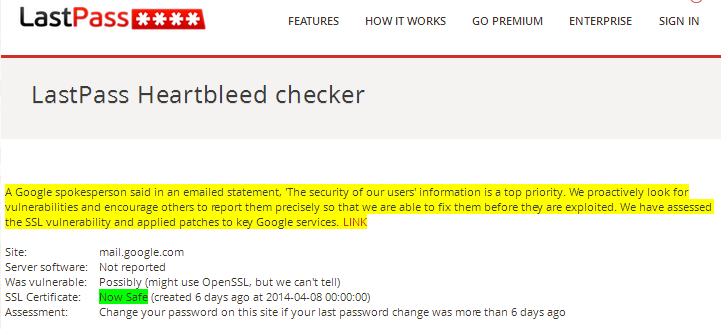
 So whether we have school IT security staff or not, it is up to all of us students, staff, and IT to proactively start changing our passwords for affected sites. But it’s not quite that simple.  You must change the password only after the affected site has patched their servers to fix heartbleed.  How do you know which sites are affected and have been patched?  Check this list at CNET.  Or better yet, run a live check on a server yourself at LastPass. This is a good time to start using complex and unique passwords to protect your online identity and to consider using a password manager to remember them all. Stay safe online!


lastpass_heartbleed_google.PNG

This blog is cross posted at Technology and Learning

Wednesday, April 23, 2014

Top tips to make your network more secure

A colleague and I brainstormed a quick list of some ways (many not costly), to help make a school (or other) network more secure, and this is what we came up with.  What would you add?

Make this more secure
1. Setup a separate BYOD guest wireless network and do not allow these devices on your main network.
2. Enable wireless isolation on your wireless networks.
3. Do not allow users to install software on district computers.
4. Consider a network access control solution to secure wired network ports.
5. Consider internal firewalls for high value servers with critical data or at least find a way to restrict network access to these servers.
6. Keep servers and security appliances up to date and patched.
7. Endpoint antivirus and malware security is still critical.
8. Don't forget about educating users.  Active user education is critical.
9. Firewalls, Spam filters, and web filters.  Many of these devices are converging into next-generation combined products, but all of these can help scan for bad web sites, phishing links, viruses, malware and more.
10. Restrict ICMP traffic at the firewall, to limit hackers ability to scan your network.
11. Consider restricting USB drives, or at the very least enforcing malware and virus scanning on these devices.
12. Have good backups of shared drives and servers, as viruses and malware are likely to attack them.

Monday, January 20, 2014

Wearable technology: Coming to a classroom near you

Carl Hooker rightly noted that wearable and connected technologies were the standout of the Consumer Electronics Show. I don't doubt the days of my fridge knowing I'm low on milk and letting my grocery store know to put it on my order are not that far away. I’m perfectly fine with my fridge restocking itself.
EyeTap
The technology of connected everything is here. Proof enough is that it's such a beautiful day here in Texas that I can't be bothered to go inside and find my laptop, so I am writing this on my iPhone on 75 degree Texas January afternoon using Google Drive. We are very connected and classrooms are increasingly more so everyday.
So my question is...is Carl Hooker correct in saying wearable technology is coming to classrooms?  My opinion is that for a while most teachers will be terrified of students wearing items like EyeTap or Google Glass. Is Billy looking up facts, recording me, or being inappropriate?  But then just a few years ago wasn't the idea of cell phones in classrooms thought to be crazy by most?  Wearable and connected technologies will certainly cause an uproar at times. Students will get in trouble. Innovators and us nerds will find great educational uses. And undoubtedly we will have to craft new policies, many of which will probably be too draconian and reactionary at the outset. What do you think the future holds for education and wearable technologies?

Sunday, January 12, 2014

From zero to working server in ten minutes – Trying out managed hosting

In an earlier blog I mentioned my requirements for a great help desk for our organization.   After a lengthy search, trial, and selection process, a winner was picked.  As it turned out, while the help desk used standard software that we support, it used a database version that we did not yet have running in our organization.  We were not able to upgrade our current databases, because other vendors’ systems required older database versions.
We talked about options such as starting another database server, and our help desk vendor mentioned that they had a lot of customers starting to run their software in the Amazon Web Services (AWS) cloud.  Like many districts, while we have had many cloud based software applications, we had never tried managed hosting, which has gained a huge amount of traction in recent years, with a huge number of players , now increasingly dominated by heavyweights such as Rackspace, Amazon, Microsoft, Google, Verizon, and IBM. 

Managed hosting is akin to renting a server, rather than buying it.  The customer gets to choose the operating system and the software stack that goes on top.  The customer typically will pay based on the software chosen, the size of the hardware needed and more.  Other charges may include additional charges for bandwidth, storage, monitoring, support, and security services.  Much like a rental of anything else, the customer has control over how long they want it, from minutes to years.  It is truly a pay as you consume commodity.  The servers are housed in the managed hosting provider’s data center, so the customer never has to worry about the plethora of mundane non-mission critical tasks that have been traditionally associated with the acquisition, installation, maintenance, and decommissioning of servers.

The traditional procurement and setup of servers in schools districts and other institutions can traditionally takes weeks, if not months.  All of the following are tasks that can be eliminated with managed hosting, so time to server spin up can be slashed:

1.       Quoting of hardware.
2.       High up front capital costs.
3.       Data center space.
4.       Air-conditioning.
5.       Power.
6.       UPS and generators.
7.       Racks.
8.       Purchase orders.
9.       Receiving and inventory of equipment.
10.   Physical setup of equipment.
11.   Operating system and software installation.
12.   Switch ports.
13.   SAN space.

I am sure there are many things I left of the list, but the point is we saved a large amount of upfront costs and saved time for our already overburdened staff.


In our case our help desk vendor had an image for us to spin up our server off of in the AWS cloud. We literally went from no server to running application server in about ten minutes.  It was incredible and makes me inclined to think that we will be running many more servers this way in the coming years.  The huge capital costs and efforts required to maintain data centers may not be sustainable when our money could be better spent on projects that benefit student learning.  While our need for servers is not likely to lessen, the cheaper and faster bandwidth becomes, the motivation for districts to move to managed hosting will increase.

This blog entry is cross posted with the great folks at SchoolCIO

Sunday, July 7, 2013

The Technology Quick Fix

After the marathon season of conferences and presentations, I have succumbed to an unexpected mid-summer illness.  Maybe this was a random occurrence or my body’s way of letting me know you have been pushing too hard too fast for a while.

All the presentations I have given and the conferences, meetings, and seminars I have attended speak to my need to learn and share with others, as well as the need for those of us in the technology world to try to get some feeling that we are somehow keeping up with the monumental shifts that technology is bringing to education and elsewhere.  I have learned a lot and then again I have learned that there are a host of great tools and technologies out there, and they are getting better every day.  But I have also never been so clearly a believer that, as these technologies improve, they will somehow transform an under-performing school or teacher into the best of their breed. 

The more I see great presentations on new technologies, systems, and devices, the more I worry that these are often bought as a quick fix for low performance, bad leadership, or other struggles that school systems and teachers face.


Yes many of these incredible technologies have great promise – but as school IT leaders we must always be willing to have some tough conversations with those we work with about making sure that these technologies are brought in not as a fix for bad teaching or leadership, but as a way to make great teachers and even better teacher.  This is really that only way that these technologies can really help schools excel in the long term.

Monday, April 22, 2013

Tablets, Laptops, and PC’s Oh My


If you were to read any educational technology magazine or site the past couple of years, you might think that there was only one device out there for use in the classroom.  While this may be pure hyperbole, it appears that the market for computing devices is changing again…..surprise!

This week saw Apple’s stock price tumble, largely seen as a barometer of things to come.   Will this also serve as an indication that the iPad’s dominance in the classroom may be waning?  Already it is predicted that Apple will be number two to Android this year in the overall tablet market.

From some of the press about trends in devices, one might think that PCs are a thing of the past, but when one looks at recently published numbers, that is hardly the case.  PC’s sales have been impacted, whether by tablets or by a lackluster Windows 8 reception.  Yet PC sales still are well above tablet sales.  And with Microsoft now executing a tablet strategy, Microsoft is still the major player in this game.  This week predictions surfaced that Microsoft may consider bringing back the Start Menu to Windows 8 with boot to the desktop functionality in an upcoming patch.  This alone could alleviate a lot of the pain association with schools and companies moving to Windows 8.  Who has the time or budget to train our staff on how to start a program, or shut down a computer?

While Apple’s iOS has made great inroads in education, Windows is still a dominant player in the market and it is a safe bet that Microsoft will continue to be a major player in education along with Google’s Android and Chrome OS.