Showing posts with label security. Show all posts

Wednesday, January 28, 2015

FERPA & Student Data Privacy - Let the privacy tidal wave begin


Recently, I had an educator ask me if students collaborating together on an assignment, through a collaborative technology such as Google Docs, could be a violation of the Family Educational Rights & Privacy Act, which most of us know as FERPA. Their concern was that as students work together, one student’s parent would be able to see the work done by the student their child was collaborating with on the assignment. This has never occurred to me as a concern, but it certainly begged investigation. After reviewing many websites, I did not find anything that would suggest a homework assignment in progress would at all be considered an educational record (and therefore protected by FERPA), as it is not part of a child’s permanent record at that point, nor is it in possession of the school at that point. In fact I did not find anything definitive that would suggest student work is FERPA protected at all. Graded work MAY be, as an individual grade itself might be part of the student record. But from the United States Supreme Court “Owasso Independent School District v. Falvo,” it is clear that an ungraded assignment is not an educational record, and therefore not subject to FERPA. 

The above is my interpretation and not a legal opinion, but it demonstrates how delicate the topic of student privacy is becoming. Increasingly, student data and privacy are being looked at with a laser focus by places like the State of California, President Obama, and organizations like Common Sense Media and CoSN. Expect to hear many more discussions and questions about what student data is shareable to further a student’s education and what data must be protected by schools and third parties.

Friday, April 25, 2014

Fix Your Bleeding Heart


Schools are known for being notoriously understaffed in their IT departments. Probably the last area any school IT department considers adding staff to is IT security. Staffing IT security in schools is an afterthought.  But now everyone reading this should be very concerned about online security and needs to take securing their online identities into their own hands. This past week with the revelation of heartbleed, a bug in the widely used Open SSL, used to encrypt and secure thousands of well known web sites, all of us have potentially had many of our passwords compromised. 

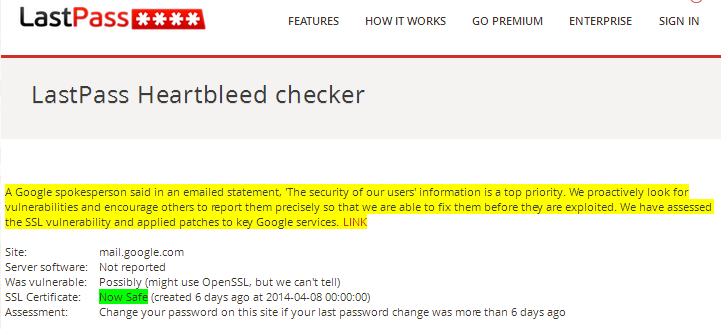
 So whether we have school IT security staff or not, it is up to all of us students, staff, and IT to proactively start changing our passwords for affected sites. But it’s not quite that simple.  You must change the password only after the affected site has patched their servers to fix heartbleed.  How do you know which sites are affected and have been patched?  Check this list at CNET.  Or better yet, run a live check on a server yourself at LastPass. This is a good time to start using complex and unique passwords to protect your online identity and to consider using a password manager to remember them all. Stay safe online!


lastpass_heartbleed_google.PNG

This blog is cross posted at Technology and Learning

Wednesday, April 23, 2014

Top tips to make your network more secure

A colleague and I brainstormed a quick list of some ways (many not costly), to help make a school (or other) network more secure, and this is what we came up with.  What would you add?

Make this more secure
1. Setup a separate BYOD guest wireless network and do not allow these devices on your main network.
2. Enable wireless isolation on your wireless networks.
3. Do not allow users to install software on district computers.
4. Consider a network access control solution to secure wired network ports.
5. Consider internal firewalls for high value servers with critical data or at least find a way to restrict network access to these servers.
6. Keep servers and security appliances up to date and patched.
7. Endpoint antivirus and malware security is still critical.
8. Don't forget about educating users.  Active user education is critical.
9. Firewalls, Spam filters, and web filters.  Many of these devices are converging into next-generation combined products, but all of these can help scan for bad web sites, phishing links, viruses, malware and more.
10. Restrict ICMP traffic at the firewall, to limit hackers ability to scan your network.
11. Consider restricting USB drives, or at the very least enforcing malware and virus scanning on these devices.
12. Have good backups of shared drives and servers, as viruses and malware are likely to attack them.

Thursday, April 19, 2012

Scam Emails Using Your Friends' Data To Look Legitimate

The Nigerian email scams still holds a place in the "how they used to do it the old days" files of cyber yesterday. I received an email today that reminded me of my Nigerian email scam favorites, but also had harvested the name and signature of a friend, such that the scam took on a very personal nature....the last name has been blotted out to protect the infected:


Ok - so at least my friend quickly figured this out.......but how many takers might bite off on something like this?

Monday, April 9, 2012

Don’t be a Phisherman! Creative Spoofed URL’s Meant to Lure Unsuspecting Twitter Users


Can you spot what makes the following a Phishing attempt?  You may not at first glance....this is a very creative:

Fake Twitter Site

The page above that looks like a legitimate Twitter site is in fact not legitimate at all.   I received a Direct Message on Twitter that had a shortened URL, which redirected to ltvvitter.com – which at first glance looks like the URL for Twitter and would probably fools lots of people into coughing up their Twitter credentials.  If someone was in a hurry or just not paying attention, they might easily fall prey to this scam.  The message the URL was sent with was meant to get people to click to find out more; The message said “Hey someone is posting terrible things about you... “, then linked to the phishing fake Twitter site.

Friday, February 17, 2012

Judson ISD February 2012 Technology Services' Newsletter

We have published our Judson ISD February Technology Services Uplink newsletter at this link.  Featured articles include:


  • Wireless - Now District Wide!!!
  • Opening Up the Web for Teaching and Learning
  • Self Service Password Manager
  • Automated Screen Locking
And more!

Thursday, August 25, 2011

Judson ISD Recognized by Cisco for Innovative Use of Building Access Control


Cisco Systems highlighted Judson ISD's innovative use of their building access control products in a brand new case study today, published at:http://www.cisco.com/en/US/prod/collateral/vpndevc/ps6918/ps9674/ps9688/casestudy_c36-637412.html

Cisco web page screenshot
jisd_cisco.png
0 comments